
Cash Flow Analyzer Pro
Turn Excel or CSV cash activity into a management-ready cash flow report with runway, burn rate, shortfall warnings, scenario forecasts, risks, opportunities, and prioritized recommendations.
Healthy
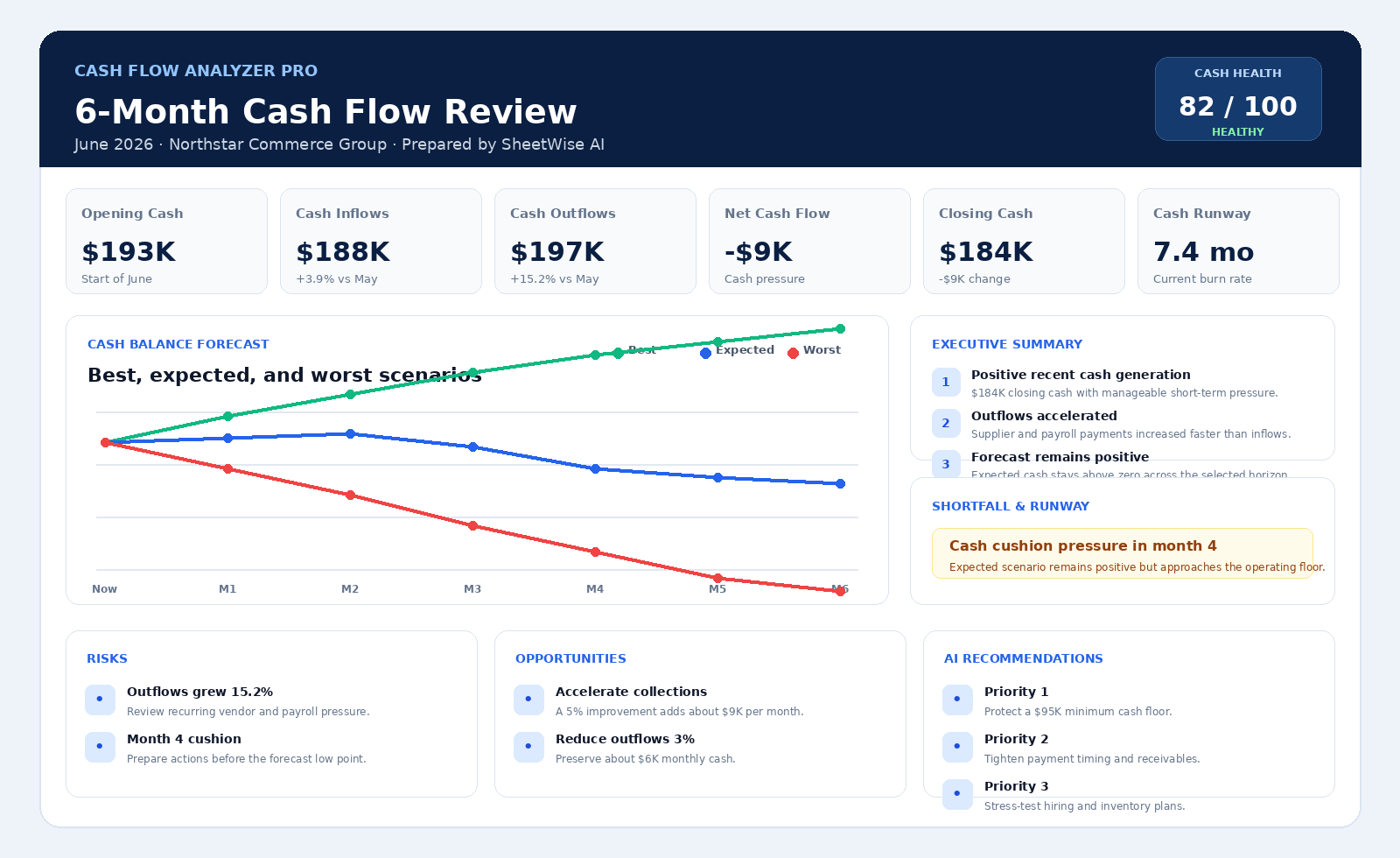
Executive insight: Cash generation remains positive, but the expected scenario shows a temporary pressure point in month four.
A complete cash position report, not another spreadsheet.
Show owners and managers exactly where cash is coming from, where it is going, how long it will last, and what actions should happen next.
Cash position
Opening cash, inflows, outflows, net cash flow, closing cash, runway, and burn rate.
Scenario planning
Best, expected, and worst forecasts across 3, 6, or 12 months.
Management actions
Shortfall alerts, risks, opportunities, and prioritized recommendations.
Build the cash flow report
Upload transaction-level or monthly summarized cash data. The analyzer automatically detects dates, inflows, outflows, and balances.
Recommended columns: Month or Date, Cash Inflow, Cash Outflow, Opening Cash, Closing Cash, Category, Department, and Notes.
12-Month Cash Flow Review
Prepared by SheetWise AI
Best, expected, and worst scenarios
From raw cash data to a decision-ready forecast.
Upload
Use bank exports, accounting summaries, or a monthly cash flow workbook.
Analyze
SheetWise identifies cash movement, runway, burn, volatility, and pressure points.
Forecast
Review best, expected, and worst scenarios over 3, 6, or 12 months.
Act
Print, export, or share a professional report with prioritized actions.
See problems early and protect working capital.
Prevent cash surprises
Identify the first forecast month where cash becomes dangerously low or negative.
Understand runway
Estimate how many months the business can operate at the current burn rate.
Compare scenarios
Stress-test revenue and expense assumptions without rebuilding the spreadsheet.
Improve collections
Spot weak inflow trends and prioritize receivables, deposits, and payment timing.
Control outflows
Highlight spending growth, recurring cost pressure, and avoidable cash leakage.
Communicate clearly
Create a management-ready report for owners, partners, lenders, or advisors.
Cash Flow Analyzer Pro questions
What data can I upload?
Excel or CSV files containing monthly or transaction-level dates, cash inflows, cash outflows, balances, categories, departments, or notes.
How is cash runway calculated?
The analyzer compares available closing cash with average monthly negative cash consumption. When the business is cash-positive, runway is shown as stable rather than artificially limited.
What do the scenarios mean?
Expected uses the detected recent trend. Best assumes stronger inflows and controlled outflows. Worst applies weaker inflows and higher outflows to expose downside risk.
Can I use it without uploading a file?
Yes. Load the professional example to test every part of the report immediately.
Can I print or export the report?
Yes. The live report supports Print / PDF and Excel-compatible export.
Does it work on iPad and mobile?
Yes. Upload, analysis, report viewing, scenario switching, and printing are designed for desktop, iPad, and mobile screens.