
Accounts Receivable & Invoice Aging Tracker Pro
Hochladen Excel or CSV invoice data and instantly see outstanding balances, overdue invoices, aging buckets, collection risk, priority accounts, and practical follow-up actions.
Needs attention
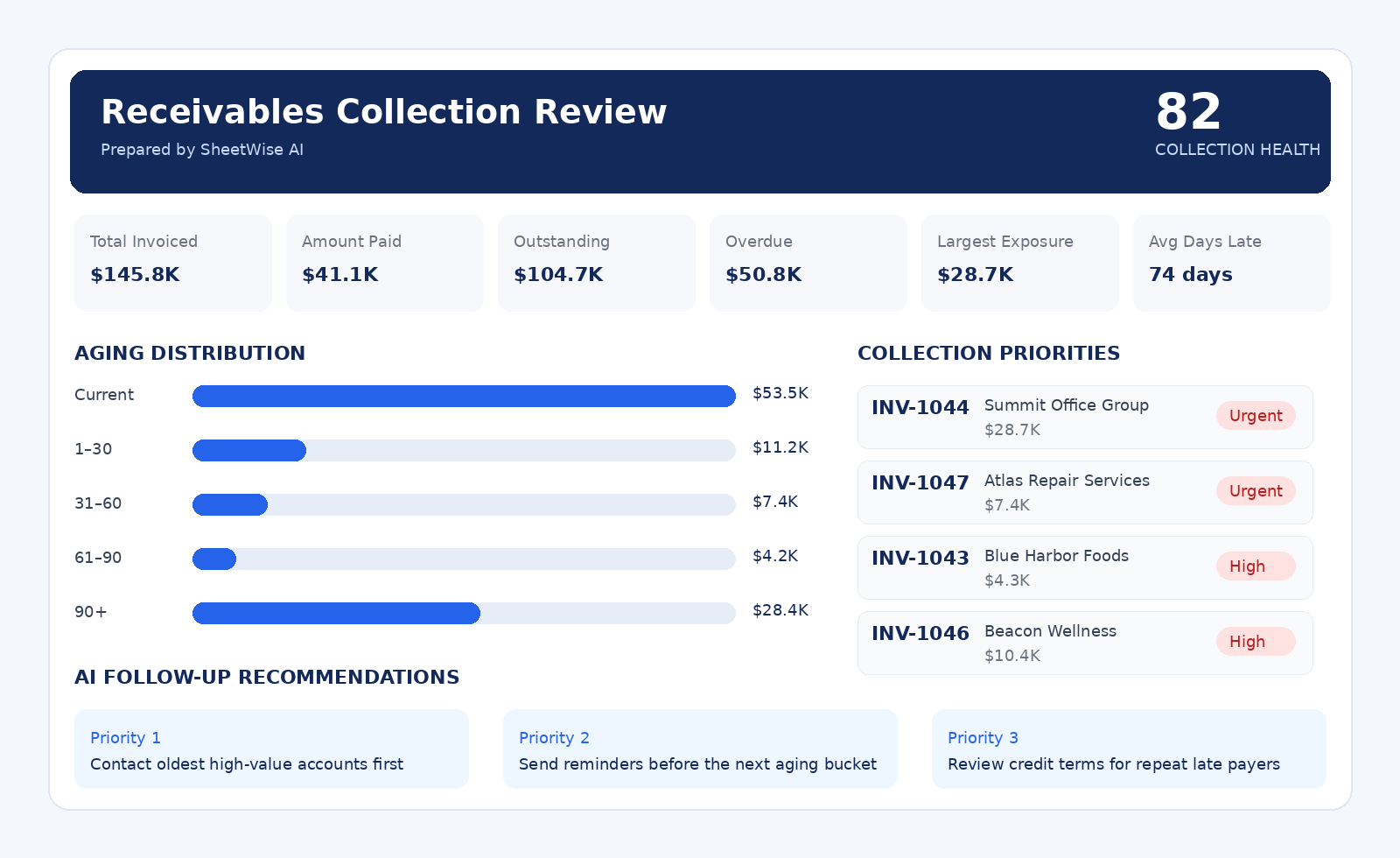
Executive insight: Two accounts represent most overdue exposure. Prioritize Summit Office Group and Atlas Repair Services this week.
A complete invoice aging report built for action.
Understand who owes you money, how late each invoice is, which accounts need attention first, and what follow-up should happen next.
Outstanding balance
Total invoiced, paid, open, overdue, and overdue rate.
Aging visibility
Current, 1–30, 31–60, 61–90, and 90+ day balances.
Collection actions
Priority customers, invoice-level status, risk alerts, and reminder suggestions.
Build the aging report
Hochladen invoice-level data. The tracker detects customer, invoice date, due date, amount, paid amount, balance, and status.
Recommended columns: Invoice Number, Customer, Invoice Date, Due Date, Invoice Amount, Amount Paid, Balance Due, Status, E-Mail.
Receivables Collection Prüfen
Prepared by SheetWise AI
Outstanding balance by aging bucket
Rechnungen requiring the fastest follow-up
| Invoice | Customer | Due date | Balance | Days late | Priority |
|---|
From invoice list to a focused collection plan.
Hochladen
Use accounting exports, invoice trackers, or your own spreadsheet.
Analysieren
SheetWise calculates balances, days late, aging buckets, and overdue exposure.
Prioritize
See which invoices and customers require attention first.
Act
Save, print, or export a professional report with follow-up actions.
Know exactly where unpaid revenue is stuck.
Reduce overdue balances
Focus attention on the largest and oldest unpaid invoices.
Protect cash flow
See how delayed customer payments affect near-term liquidity.
Segment risk
Separate current invoices from 30, 60, 90, and 90+ day exposure.
Prioritize customers
Identify accounts with the greatest financial impact.
Prepare follow-ups
Erstellen clear collection actions for owners, managers, and accounting staff.
Report professionally
Share a management-ready aging report with partners, lenders, or advisors.
Invoice Aging Tracker Pro questions
What data can I upload?
Excel or CSV files with customer, invoice number, invoice date, due date, invoice amount, amount paid, balance, status, and optional contact information.
How are aging buckets calculated?
Open balances are grouped as Current, 1–30, 31–60, 61–90, and 90+ days based on the due date.
Can the tool detect different column names?
Yes. It recognizes common labels such as Client, Customer, Invoice Total, Paid, Outstanding, Due, and Payment Status.
Can I test it without a file?
Yes. Load the professional example or download the included sample workbook.
Can I print or export the report?
Yes. Use Open PDF & Print, download an Excel-compatible export, or save the report to Arbeitsbereich.
Does it work on iPad and mobile?
Yes. Hochladen, analysis, report viewing, saving, and printing are responsive.